使用指南
Profiles Enhanced Mode 增强模式
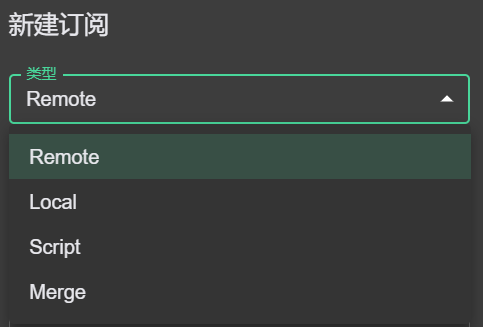
目前支持 4 种类型的配置文件,分别是 Remote、Local、Script、Merge。其中,Remote 和 Local 类型为主配置文件,Script 和 Merge 类型为增强配置文件,用于修改主配置文件的。点 新建 可以创建这些配置文件,对于 Remote 类型的,也可以直接输入 URL 后导入即可。(备注:该模式主要参考了 CFW 的实现)
Remote 远程配置
目前仅支持 clash 格式的配置链接,即响应体数据是符合 clash 配置格式的(utf8 编码)。如果响应头中存在 Subscription-Userinfo 字段,则其对应的流量信息会展示出来。远程配置可以点击右上角的更新按键自动更新。
Local 本地配置
新建本地配置之后,右键 - 打开文件 即可打开对应的本地配置文件(默认会用 VScode 打开,如果找不到执行程序则用默认编辑器打开)。在编写完本地配置之后右键 - 使用 即可刷新该配置。
Merge 合并处理
该配置类型用于对主配置进行字段增加的操作,文件格式是 yaml。该 idea 源于 CFW 配置预处理中的简便方法。目前仅支持 6 种操作类型。启用方法:右键 - 启用,在修改了文件之后,点击刷新触发配置变更。
prepend-rules:类型和 clash rules 配置一致,内容合并到 rules 前append-rules:类型和 clash rules 配置一致,内容合并到 rules 后prepend-proxies:类型和 clash proxies 配置一致,内容合并到 proxies 前append-proxies:类型和 clash proxies 配置一致,内容合并到 proxies 后prepend-proxy-groups:类型和 clash proxy-groups 配置一致,内容合并到 proxy-groups 前append-proxy-groups:类型和 clash proxy-groups 配置一致,内容合并到 proxy-groups 后- 其他 clash 的字段:5 个默认使用的字段(rules, proxies, proxy-groups, proxy-providers, rule-providers)以及其他 clash-meta 支持的字段,直接设置这些字段将直接覆盖 profile 对应字段的内容。
Script 脚本处理
该配置类型提供编写 JS 脚本修改配置的能力,JS 运行时为 quickjs。该 idea 源于 CFW 配置预处理中的 Mixin/parser。启用方法:右键 - 启用,在修改了文件之后,点击刷新重置配置文件。
脚本中需要声明一个 main 函数,函数签名为 main(params: object): object。函数入参为序列化为 js object 的 clash 配置,务必返回处理后的 js object。
如果脚本中存在异常未处理,处理程序将跳过该脚本所做的操作,并且对应的 profile 项将变红和报错提示。
脚本执行环境采用 quickjs 实现,不能执行如文件系统访问等操作。
Profiles 的处理流程
首先选择一个主配置文件,如果没有就是默认的空配置。其次如果存在 Script 和 Merge 这些增强配置,且已经启用了,则会按顺序进行链式处理。即前一个处理的结果作为下一个处理的输入。
Guide
Profiles Enhanced Mode
Currently supports 4 types of profile files: Remote, Local, Script, and Merge. Remote and Local types are main profiles, while Script and Merge types are enhanced profiles used to modify main profiles. Click New to create these profiles, or for Remote type, directly input a URL to import. (Note: This mode is mainly inspired by CFW implementation)
Remote
Currently only supports clash format configuration links, meaning the response body data conforms to the clash configuration format (utf8 encoding). If the response header contains a Subscription-Userinfo field, the corresponding traffic information will be displayed. Remote profiles can be automatically updated by clicking the update button in the upper right corner.
Local
After creating a local profile, right-click - Open File to open the corresponding local configuration file (VScode by default, or the default editor if not found). After editing the local configuration, right-click - Use to refresh the profile.
Merge
This profile type is used to add fields to the main profile, in yaml format. Inspired by CFW profile preprocessing. Currently supports 6 operation types. Enable method: right-click - Enable, after modifying the file, click Refresh to trigger profile changes.
prepend-rules: Same format as clash rules, merged before rulesappend-rules: Same format as clash rules, merged after rulesprepend-proxies: Same format as clash proxies, merged before proxiesappend-proxies: Same format as clash proxies, merged after proxiesprepend-proxy-groups: Same format as clash proxy-groups, merged before proxy-groupsappend-proxy-groups: Same format as clash proxy-groups, merged after proxy-groups- Other clash fields: The 5 default fields (rules, proxies, proxy-groups, proxy-providers, rule-providers) and other clash-meta supported fields will directly overwrite the corresponding fields in the profile.
Script
This profile type provides the ability to write JS scripts to modify configurations. The JS runtime is quickjs. Inspired by CFW Mixin/parser. Enable method: right-click - Enable, after modifying the file, click Refresh to reset the profile.
The script must declare a main function with signature main(params: object): object. The function input is the clash configuration serialized as a js object, and must return the processed js object.
If there are unhandled exceptions in the script, the handler will skip the operations made by the script, and the corresponding profile item will turn red with an error message.
Profiles Processing Flow
First select a main profile, if none exists, the default is an empty configuration. Then, if there are Script and Merge enhanced profiles that are enabled, they will be processed in chain order. That is, the result of the previous processing is the input for the next.